A few years ago, we created a digital access and backup strategy for our important documents. It’s worked out really well. Now we can pull up any document on our phone, laptop or tablet in seconds. It’s also much safer than keeping paper copies around the house.
Most people don’t realize how many important documents they have until they start packing for a move. Birth certificates, tax returns, wills, insurance policies and more. You don’t want to carry all of those documents halfway around the world. The usual move is to stuff it all into one folder and hope for the best. We’d rather not bet on a folder full of papers being left on a plane, surviving customs or a lost suitcase.
The first rule. Don’t pack your original documents with your household goods shipment and don’t hand them to a moving company. Shipments get delayed. They get inspected, misrouted or sometimes lost for good. A box sitting in a warehouse or a customs hold for weeks is the last place you want your birth certificate or your will.
There’s also a second risk. A box full of Social Security cards, tax returns and bank papers is exactly what someone would need to steal your identity or get access to your accounts. Once that box leaves your hands, you have no idea how many people handle it along the way. Anything important and anything with your personal information on it, should travel with you. Not with the movers.
What Should You Backup?
Before getting into strategy, it’s worth being specific about what belongs on the list, since this is the part people tend to underestimate:
None of these need to leave the country as paper. Every one of them needs to exist somewhere secure and accessible in digital form, ideally before you’re standing in Spain being asked for a document you left in a drawer back in the US.
Don’t Store Your Digital Copies All In One Place
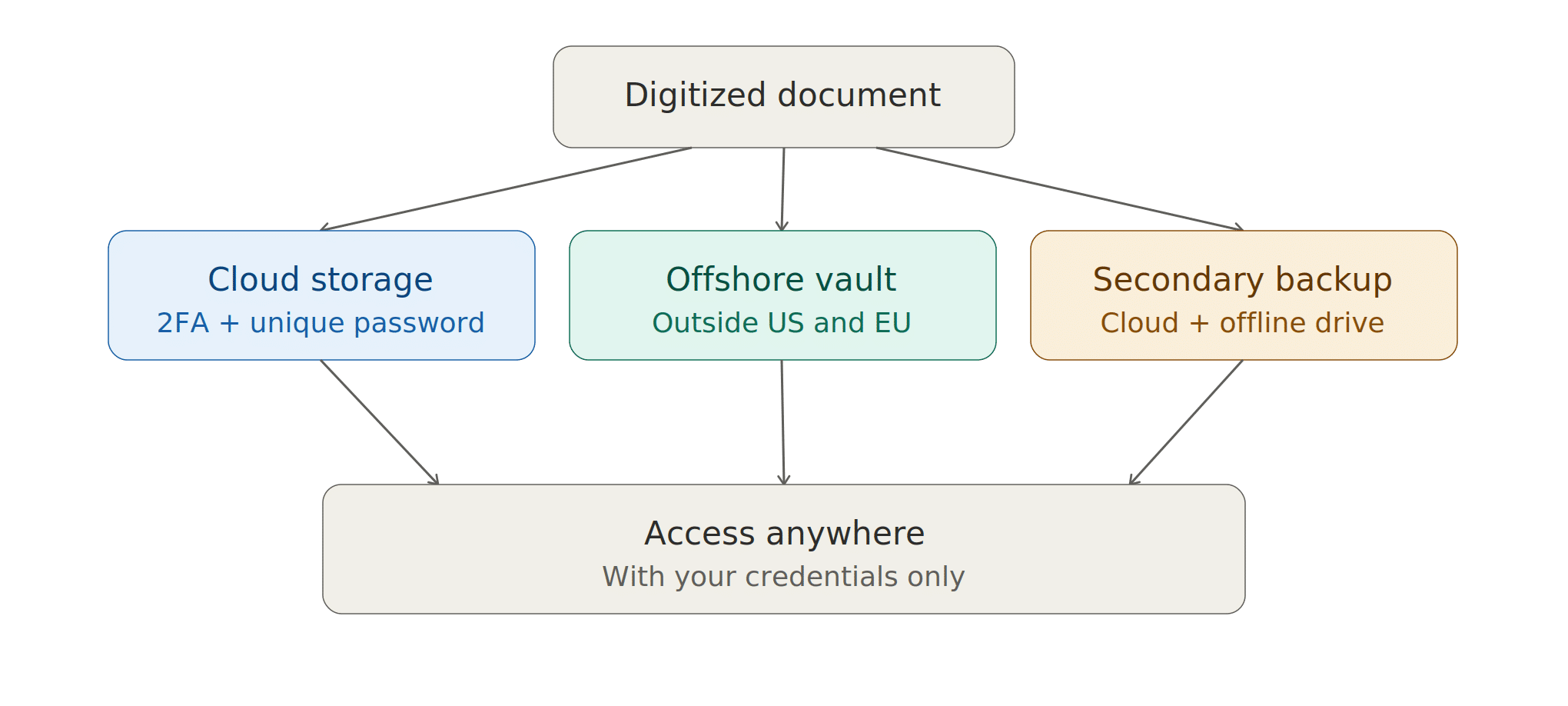
The mistake most people make isn’t skipping the scanning step. It’s scanning everything and dumping it into one cloud account and calling it done. That’s convenient, but it’s also a single point of failure. If that one account gets hacked, forgotten, or locked, everything goes with it. Our approach spreads the risk across a few layers. Each layer solves a different problem, so no single failure point causes a catastrophe.
Layer One: Cloud Storage
We keep a complete set of copies in iCloud, protected by two-factor authentication so a stolen password alone isn’t enough to get in. For anything especially sensitive, we go a step further and password-protect the PDF itself. That’s a third layer, and the password isn’t reused anywhere else. If someone got past the cloud account entirely, they’d still be staring at a locked file.
You can also use any other highly rated secure service like Google Drive, Microsoft OneDrive, Dropbox, Box, etc. Just make sure whatever you pick offers the security you need and fits your budget.
Layer Two: Third Country Storage
This is the layer most people skip and we think it matters the most. We keep a full backup with SecureSafe, a Swiss data vault built on zero-knowledge encryption. That means the company itself can’t open your files even if someone forced them to try.
You can access it from any browser or device, and by default it doesn’t keep files on your computer. If you’d rather not upload future document changes manually, you can also set up a synced folder on your computer that updates SecureSafe automatically, but that’s optional. It supports two-factor authentication and device biometrics, like Face ID and Touch ID. Because it’s hosted in Switzerland, your documents sit outside both US and EU legal reach. That matters if you want your most sensitive records somewhere neither government can easily access.
The tradeoff for that much security is real. If you lose your password and haven’t set up a backup recovery code, nobody can get access. Not you and not the company. That’s the point, not a flaw. But it means setting up recovery properly matters more here than anywhere else in this process.
Layer Three: Redundant Backups
On top of both of those, we run a second automatic cloud backup through iDrive and keep encrypted, password-protected flash drives as a final offline copy. The goal is simple: no single event, a hack, a forgotten password, a dead hard drive, should ever leave us without something we genuinely need.
One quick note on the services named here: we have no partnership with any of them. These are simply the tools we researched, used ourselves for years and have been happy with.
Extra Capabilities With SecureSafe
Beyond storage, SecureSafe has a couple of features that solve real, smaller problems. It lets people mail documents directly into your vault. That’s useful when a bank, gestor or attorney needs to send you something securely, instead of it sitting in an unprotected email inbox. It also lets you send files out through an encrypted channel to someone who doesn’t use SecureSafe. That comes up more than you’d expect once you start dealing with Spanish institutions that want an official copy of something.
What Happens If You’re Incapacitated Or Die?
If you’re the only one who can unlock any of this, what happens if you can’t? SecureSafe has a built-in answer called data inheritance. You name one or more beneficiaries ahead of time, decide exactly what they’re allowed to access and give a separate access code to someone you trust to start the process. There’s a waiting period after that code is used. You’ll be notified as well, so if it’s ever triggered by accident or too soon, you can log in and stop it before any one else has access.
iCloud and iDrive don’t have anything built in like that. The fix is simpler than it sounds: keep the master passwords for both in a password manager that offers the same kind of legacy access and make sure one person you trust knows it exists and how to get in if they ever need to.
Either way, the goal is the same. One person in your life should have a documented way into this system if something happens to you, instead of everything disappearing along with your password. This is also worth thinking through when you write or update your will. Decide how your “digital estate” should be handled.
What Should You Do With The Original Documents?
Having digital backups doesn’t mean you should destroy every original. Spanish bureaucracy still wants to see the actual apostilled document for some things, including your birth certificate and marriage certificate, if either comes up during NIE, TIE or residency paperwork. A PDF won’t satisfy that requirement, so think carefully about where you keep the originals in case you need them.
Most Spanish procedures don’t actually want your raw original. They want an apostilled copy, and sometimes a certified translation on top of that. The apostille itself has to be requested using the original document so the order matters. Get the apostille done first. Order more copies than you think you’ll need, since each Spanish office you deal with may want its own. Only once that’s done should you decide what to do with the original. Timing matters too. Apostilled and translated copies are usually only valid for six months.
Original Document Storage Strategy
Where should your originals live? If you’re planning to leave one with a relative, a friend, or in a safe deposit box, don’t do it until you’ve confirmed you already have every apostilled copy you’ll need going forward. It’s frustrating to discover, months into Spanish paperwork, that your one apostilled birth certificate is all you have and the needed original to get more is sitting in a drawer back in the US.
Split your physical documents into two groups. Anything you know you’ll need to show in person in Spain travels with you, in a carry-on, never checked luggage. That way it’s within reach the day you actually need it. Everything else, the documents that matter but likely won’t come up in your first few months, stays behind in the US with someone you trust. A family member who can overnight the original or send a fresh scan if something unexpected comes up.
Should You Consider A Safety Deposit Box?
A bank safe deposit box is the other common option. It’s a solid middle ground if you’d rather not ask a relative to hold onto your paperwork. The tradeoff is speed. A trusted person can act the same day. A safe deposit box in another country generally can’t. Neither choice is wrong. It comes down to how fast you might need the original back, and who you’d rather have holding onto it.
If you’re considering a safe deposit box in Spain, don’t assume your local bank branch has one. Availability has gotten inconsistent. Some banks, like BBVA, still offer them under the name cajas de seguridad or cajas de alquiler, but many others have quietly dropped the service. A handful of private, non-bank vault companies have filled that gap in cities like Madrid, Barcelona and Marbella and they don’t require you to have an account with them. It’s worth a quick call to your Spanish bank either way to check out your options.
Is A Digital Storage Strategy Worth It?
This might sound like a lot of steps just for some paperwork. But once it’s set up, it barely takes any effort to keep going and it solves three real problems at once: it protects your information, it takes the stress out of moving day, and it makes your life easier for years after the move.
Most of your documents no longer needs to survive the trip as paper, which removes a surprising amount of stress on moving day. Whatever does need to travel or stay behind has a clear home, instead of sitting loose in a folder you’re hoping doesn’t go missing. It also cuts down on the reflex to rent a safety deposit box in the US, in Spain, or both, just to have somewhere “safe” to put things you might never need in person again. Some people will still want one and that’s fair, but it’s no longer the only thing standing between you and losing access to your own paperwork.
What you end up with is genuinely more secure than a folder ever was and far easier to reach at 9pm on a Sunday when a Spanish office asks for a document you didn’t think to bring. Start scanning your documents early. It always takes longer than expected. Once the system is built, it runs quietly in the background and you’ll be glad it’s there the first time you actually need it.